Updated October 31, 2026
Climbing Controls and Grip Management
Read the grip meter and use stage recommendations to prepare for a crossing.
Quick answer
The official desktop input is hold SPACE for walls, ceilings and gap traversal. Practice on the tutorial wall before attempting a long ceiling section.
Work through the guide
Use the current server interface when requirements have changed.
Hold SPACE to attach and climb
Hold SPACE to attach and climb
- Success check
- Read the matching meter or stage label before attempting the next movement.
- If it remains unclear
- Return to the previous solid surface or lobby when the current requirement or route is unclear; inspect the current screen before spending currency.
Read the supporting evidence
§Hold SPACE to attach and climb#
The official desktop input is hold SPACE for walls, ceilings and gap traversal. Practice on the tutorial wall before attempting a long ceiling section.
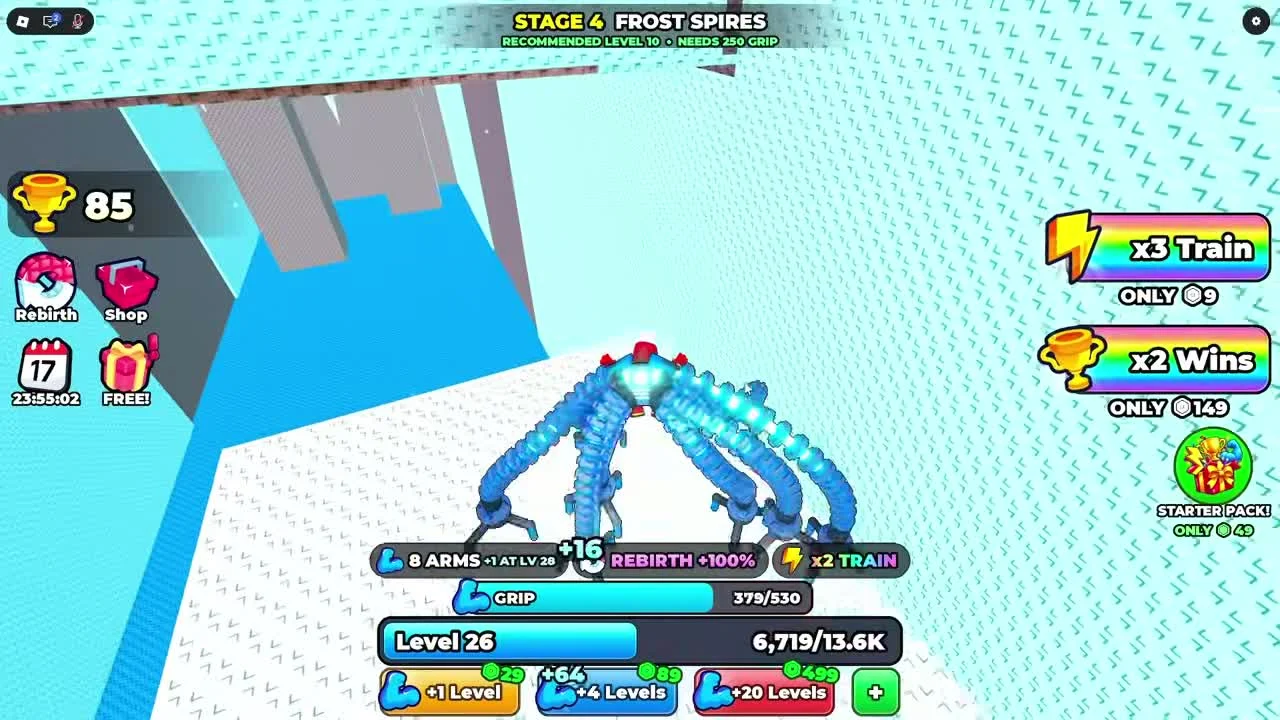
The footage shows a blue GRIP meter above the level bar. Its current and maximum values tell you how much grip remains while attached.
Check remaining grip before a long crossing
Check remaining grip before a long crossing
- Success check
- Read the matching meter or stage label before attempting the next movement.
- If it remains unclear
- Return to the previous solid surface or lobby when the current requirement or route is unclear; inspect the current screen before spending currency.
Read the supporting evidence
§Check remaining grip before a long crossing#
Grip drains while hanging. If it empties, you fall. Compare the current meter with the length of the crossing before moving away from a landing.
If depletion repeatedly ends a climb, return to training. The developer states that additional arms improve grip. A universal recovery rate and safe-distance formula have not been verified.
Treat recommendations as preparation guidance
Treat recommendations as preparation guidance
- Success check
- Read the matching meter or stage label before attempting the next movement.
- If it remains unclear
- Return to the previous solid surface or lobby when the current requirement or route is unclear; inspect the current screen before spending currency.
Read the supporting evidence
§Treat recommendations as preparation guidance#
Stage banners display recommended level and needed grip. The recording enters Frost Spires below its displayed 250 grip value, so this guide does not describe that number as a proven hard entry lock.
Use the displayed recommendation to choose a training target, then assess your current route and grip meter. Updates can change both the recommendations and the stage layout.
A fall can happen with grip remaining
A fall can happen with grip remaining
- Success check
- You distinguish the revive offer from your remaining grip.
- If it remains unclear
- Return to the previous solid surface or lobby when the current requirement or route is unclear; inspect the current screen before spending currency.
Read the supporting evidence
§A fall can happen with grip remaining#
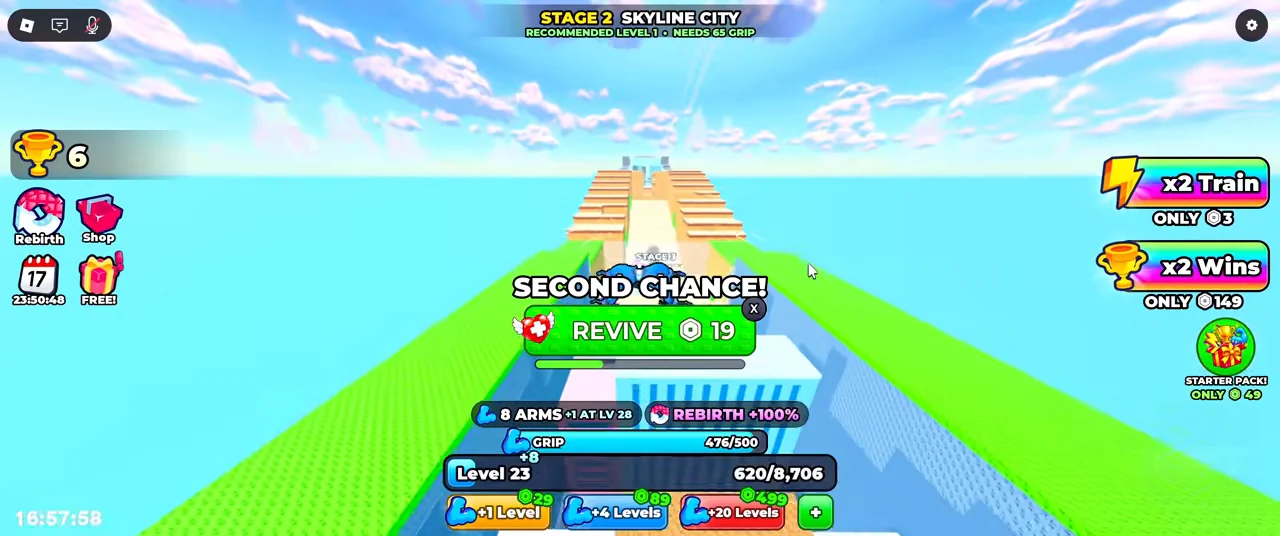
The ordinary gameplay recording shows a Second Chance revive prompt in Skyline City while the grip meter still reads 476/500. An almost-full meter does not guarantee that your current path reaches a solid landing. Check the gap and your contact with the next wall as well as the remaining grip.
The visible revive prompt displays a 19 Robux offer and a small close button. Read that prompt before selecting it. This guide does not treat a paid revive as a required step or identify the exact cause of that recorded fall.
Scope and sources
Official description and recorded interface checked October 31, 2026.
- Recorded interface values can change. Paid boosts are present in the reviewed community recording.